Installing Windows Server and adding users isn't even 1/2 the battle.
The battle of getting it installed on old hardware was actually the easier part.
While I have never been a fan of trying to document my thought processes, it is my hope that when this is all said and done I will be able to reflect upon it.
I hope within those reflections to see improvement, which is the ultimate gain as far as I am concerned.
I can figure things out, I can even explain things well to non-technical users, but I suck when it comes to documenting things.
## The Domain
Today I built the domain. I built it to align with an enterprise-grade, tiered administration architecture.
I established the hierarchy—**Tier 0** for identity, **Tier 1** for servers, and **Tier 2** for workstations. All additional objects will be created within these secured containers.
A part of my goal was to eliminate the risk of administrative credential overlap and to establish strictly enforced security boundaries that are required for a production-level environment.
Getting here was definitely a battle. I tried to automate the OU setup with a PowerShell script early on, but that ended up creating a mess that I had to spend extra time manually fixing. On top of that, I was fighting against AD’s built-in "Protected from Accidental Deletion" flags and some persistent GUI bugs that made it impossible to see what was actually happening in the directory. I even hit a point where the server dropped into DSRM after I forced some service restarts. I had to pivot to a much more careful, PowerShell-first approach to verify every single existence and move because they did not show in the GUI.
After correcting the boot configuration, I finally got the domain controller stable and perfectly aligned with the design posted below.
```text
# Domain Root (chuckstrangecom.local)
├── Tier0
│ ├── Admins
│ ├── ServiceAccounts
│ ├── Computers (DCs, PAWs if added)
│ └── Groups
├── Tier1 (Servers)
│ ├── Servers
│ │ ├── Infrastructure (e.g., monitoring, security tools)
│ │ ├── Application
│ │ └── HyperV
│ ├── Admins
│ ├── ServiceAccounts
│ └── Groups
├── Tier2 (Users & Workstations)
│ ├── Users
│ │ ├── Departments (sub-OUs)
│ │ │ ├── IT
│ │ │ ├── HR
│ │ │ ├── Finance
│ │ │ ├── Operations
│ │ │ └── Sales (or whatever fits your 15-30 person sim)
│ │ └── Executives (special policies)
│ ├── Computers
│ │ ├── Workstations
│ │ ├── Laptops
│ │ └── Servers (if any Tier 2)
│ ├── Admins (Tier 2 admins)
│ └── Groups
├── ServiceAccounts (Global non-tiered or legacy)
├── Test (for experimentation)
└── Groups (or nest under tiers)
```
During this stage of setup, I attempted to establish a failsafe emergency recovery account for myself in the event of incident. While I hope I never have to use it, the reality is that is exactly why I am going through all of this.
Part of it is to gain experience in the setup, managing users, policies, hardware, a full enterprise monitoring stack, and then eventually to attack it.
I am not configuring it to be intentionally vulnerable, because I want my penetration tests to be real world accurate, as much as I can make them be.
This is not just a couple laptops or desktops strung together for gaming.
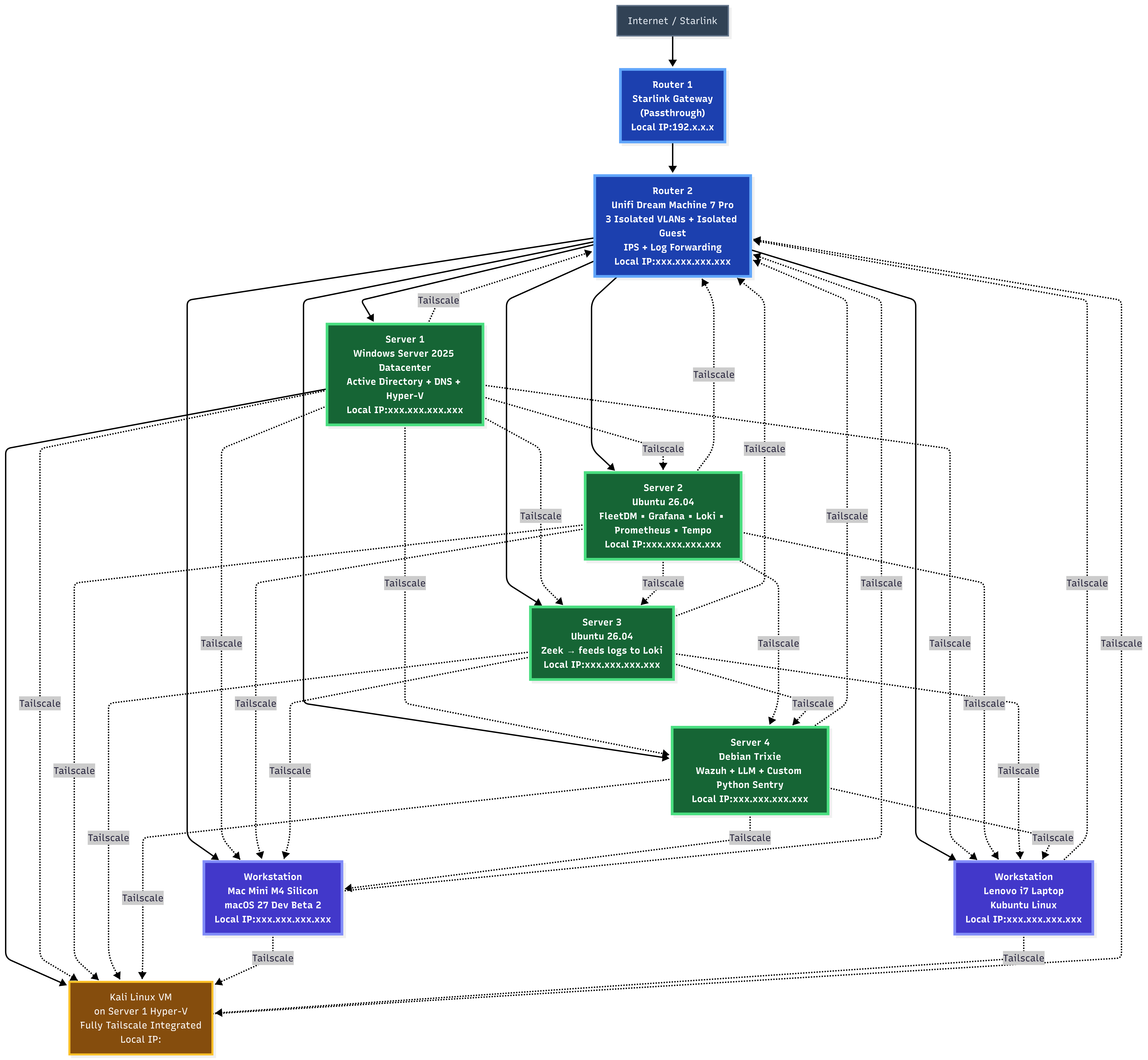
**The whole network looks like this:**